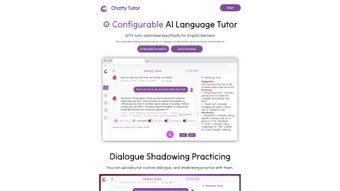

Télécharger Chatty Tutor – Outil d’apprentissage de l’anglais alimenté par l’IA pour une fluidité rapide
Introduction
Chatty Tutor est une plateforme d’apprentissage des langues pilotée par l’IA qui met la puissance des Transformateurs Génératifs Pré‑entraînés (GPT) à la portée des apprenants d’anglais de tous niveaux. Contrairement aux applications traditionnelles basées sur des manuels, Chatty Tutor crée un environnement dynamique, centré sur la conversation, où les apprenants peuvent parler, écouter et recevoir des retours instantanés et riches en données. L’outil vous permet de personnaliser les invites, de choisir parmi une variété de personnages vocaux et d’ajuster la vitesse de parole, afin que l’expérience d’apprentissage reflète le dialogue du monde réel.
L’une de ses fonctionnalités les plus convaincantes est la pratique d’ombre de dialogue — une technique immersive où vous répétez les phrases générées par l’IA en temps réel, améliorant la prononciation, le rythme et la confiance. De plus, la plateforme propose des aides visuelles de vocabulaire, des évaluations de prononciation avec un scoring détaillé, et une interface épurée basée sur le navigateur qui fonctionne également nativement sur macOS. Bien que l’absence d’une application mobile dédiée et le support uniquement macOS‑desktop puissent limiter l’accessibilité pour certains utilisateurs, la profondeur de l’interactivité et la qualité du contenu généré par l’IA font de Chatty Tutor un choix remarquable pour quiconque souhaite maîtriser l’anglais rapidement et avec plaisir.
Que vous soyez étudiant préparant des examens, professionnel perfectionnant votre communication d’affaires, ou voyageur cherchant à converser couramment, Chatty Tutor s’adapte à vos objectifs et fournit des progrès mesurables à chaque session.
Fonctionnalités clés qui distinguent Chatty Tutor
Le cœur de Chatty Tutor réside dans son moteur IA sophistiqué et la suite d’outils qui l’entourent. Chaque fonctionnalité est conçue pour maintenir les apprenants engagés, fournir des retours correctifs instantanés et accélérer la fluidité grâce à la pratique active. Voici une liste exhaustive des capacités les plus précieuses, chacune expliquée en détail pour vous aider à comprendre comment elles contribuent à une expérience d’apprentissage enrichie.
- GPT‑Optimized Dialogue Generation: Leverages the latest GPT models to produce natural, context‑aware conversations that adapt to your proficiency level. The system tracks your previous interactions, ensuring continuity and progressive difficulty.
- Customizable Voice Characters: Choose from male, female, and neutral voices with adjustable accents and speaking speeds to match your listening preferences. This flexibility helps learners become comfortable with a range of English dialects.
- Dialogue Shadowing Practice: Real‑time shadowing mode lets you repeat AI sentences while tracking timing and intonation, a proven method for fluency acceleration. Visual waveforms and timing markers guide you toward native‑like rhythm.
- Pronunciation Assessment Engine: Uses acoustic analysis to score your speech, highlighting problem phonemes and offering corrective suggestions. Scores are broken down by syllable, vowel, and consonant for granular insight.
- Visual Vocabulary Tools: Interactive flashcards, image‑linked word banks, and contextual sentence examples improve retention through multimodal learning. Each word is accompanied by pronunciation audio and usage notes.
- Browser‑Based Access + macOS App: No heavy downloads needed; you can start learning instantly on any modern browser, and a native macOS client provides offline capabilities for pre‑downloaded lessons.
- Prompt Personalization: Write your own conversation starters or let the AI suggest topics ranging from travel to business English, ensuring relevance to your personal or professional interests.
- Progress Analytics Dashboard: Track daily practice time, pronunciation scores, and vocabulary growth with clear visual charts. Exportable PDF reports let you share progress with teachers or employers.
Ensemble, ces fonctionnalités créent un écosystème où la pratique orale, le développement du vocabulaire et la correction de la prononciation se produisent simultanément, éliminant l’approche fragmentée typique de nombreuses applications linguistiques. Le résultat est une expérience cohérente et engageante qui maintient les apprenants motivés jour après jour.
Installation & Utilisation – Commencer en quelques minutes
Démarrer avec Chatty Tutor est intentionnellement sans friction. Parce que le service principal fonctionne dans le cloud, vous n’avez besoin que d’une connexion Internet stable et d’un navigateur supporté (Chrome, Safari ou Edge). Suivez ces étapes pour télécharger, installer et commencer votre première leçon :
- Visit the Official Site: Navigate to www.chattytutor.com and click the “Start Free Trial” button. You’ll be prompted to create an account using an email address or social login.
- Verify Your Email: A confirmation link arrives within seconds. Clicking it activates your account and unlocks the full feature set for a 7‑day trial.
- Choose Your Platform: For browser use, simply stay on the website and begin a session. macOS users can download the dedicated client by clicking “Download for macOS,” which provides a signed .dmg file.
- Install the macOS Client (Optional): Open the .dmg, drag the Chatty Tutor icon into your Applications folder, and launch the app. The first run will ask for permission to access your microphone—grant it for pronunciation analysis.
- Set Up Your Learning Profile: Input your current English level (A1‑C2), preferred learning goals (e.g., business communication, travel), and select a voice character. The platform tailors the difficulty and content automatically.
- Start a Dialogue Session: Click “New Conversation,” choose a topic, and the AI will generate a prompt. Speak into your microphone; the system records, evaluates, and provides instant feedback.
- Use Shadowing Mode: Activate the shadowing toggle to hear the AI phrase, then repeat it in real time. The UI displays a waveform and timing markers so you can see how closely you match the native rhythm.
- Review Your Progress: After each session, visit the “Dashboard” to view pronunciation scores, vocabulary words added, and overall practice time. Export reports as PDF for offline review.
The learning curve is gentle because the interface mirrors familiar chat apps—messages appear in speech bubbles, and all controls are accessible with a single click. For users who prefer a more structured curriculum, Chatty Tutor also offers pre‑made lesson paths, each consisting of ten progressive dialogues, quizzes, and pronunciation drills. Whether you spend five minutes a day or two hours, the platform scales to match your commitment level.
Compatibilité, Avantages & Inconvénients, et FAQ
Systèmes d’exploitation pris en charge
Chatty Tutor runs on any modern web browser, which means it works on Windows, Linux, ChromeOS, and macOS without the need for additional software. A native desktop client is currently available for macOS 10.15+ only. No Windows, Android, or iOS mobile apps exist at this time, which may be a drawback for users who study on the go. However, the browser version is fully functional on mobile browsers, offering a responsive experience for occasional tablet or phone use.
Avantages
- AI‑generated, context‑aware conversations feel natural and keep learners engaged.
- Customizable voice and speed options accommodate diverse listening preferences.
- Shadowing practice directly targets fluency, a feature rarely found in other language apps.
- Pronunciation scoring provides concrete, actionable feedback rather than vague encouragement.
- Visual vocabulary aids support multimodal learning, improving recall.
- Browser‑based access eliminates heavy installations and ensures automatic updates.
Inconvénients
- No dedicated mobile app for Android or iOS limits learning on smartphones and tablets.
- Desktop client is macOS‑only, leaving Windows users reliant on the browser version.
- Custom dialogue creation requires user input; the AI does not generate entirely new scenarios without prompts.
- Free tier limits daily practice time, encouraging an upgrade to the paid plan for serious learners.
FAQ – Vos questions, nos réponses
Below are the most common queries from new users. Each answer is crafted to give you a clear understanding of how Chatty Tutor works and what you can expect from the platform.
Is Chatty Tutor suitable for absolute beginners?
Yes. When you create your profile, you can select “Beginner (A1)” and the AI will generate simple sentences, basic vocabulary, and slower speech rates. The shadowing mode also includes visual cues to help you match pronunciation.
Can I use Chatty Tutor without an internet connection?
The macOS desktop client offers limited offline functionality for previously downloaded lessons. However, the AI dialogue generation and pronunciation assessment require an online connection.
How does the pronunciation assessment work?
The system records your speech, extracts phonetic features, and compares them to native speaker models. You receive a score (0‑100) for each phoneme, plus tips on mouth position and intonation.
What payment plans are available?
Chatty Tutor offers a free trial, a monthly subscription at $14.99, and an annual plan at $149 (two months free). All plans include unlimited access to dialogues, shadowing, and pronunciation feedback.
Is my data safe when I speak into the microphone?
Yes. Audio recordings are encrypted in transit and stored only for the duration of the analysis. The platform complies with GDPR and does not sell personal data to third parties.
Reviewer Verdict: Chatty Tutor delivers a sophisticated AI‑driven learning experience that rivals premium language schools, especially for learners who thrive on speaking practice. Its few platform limitations are outweighed by the depth of interaction and measurable progress tracking.
Conclusion – Sautez le pas et téléchargez Chatty Tutor dès aujourd’hui
Si vous avez essayé des applications de cartes mémoire statiques ou des leçons vidéo qui vous laissent passif, Chatty Tutor offre une alternative rafraîchissante et active qui place la conversation au cœur de l’apprentissage. La combinaison de dialogues alimentés par GPT, de réglages vocaux personnalisables et d’ombre en temps réel crée une atmosphère de classe directement sur votre écran. Bien que l’absence d’une application mobile puisse être un inconvénient à court terme, l’accessibilité via le navigateur garantit que vous pouvez commencer instantanément sur n’importe quel ordinateur, et les utilisateurs macOS bénéficient d’un client natif fluide. Avec un scoring de prononciation clair et des outils de vocabulaire visuels, vous verrez une amélioration mesurable en quelques semaines de pratique régulière.
Prêt à parler anglais avec confiance ? Téléchargez Chatty Tutor maintenant, profitez de votre essai gratuit, et découvrez le futur de l’apprentissage des langues. Que vous prépariez un entretien, voyagiez à l’étranger, ou simplement élargissiez vos compétences, Chatty Tutor vous équipe des outils nécessaires pour transformer chaque conversation en opportunité d’apprentissage.



.png)



